
What's new in 2.3
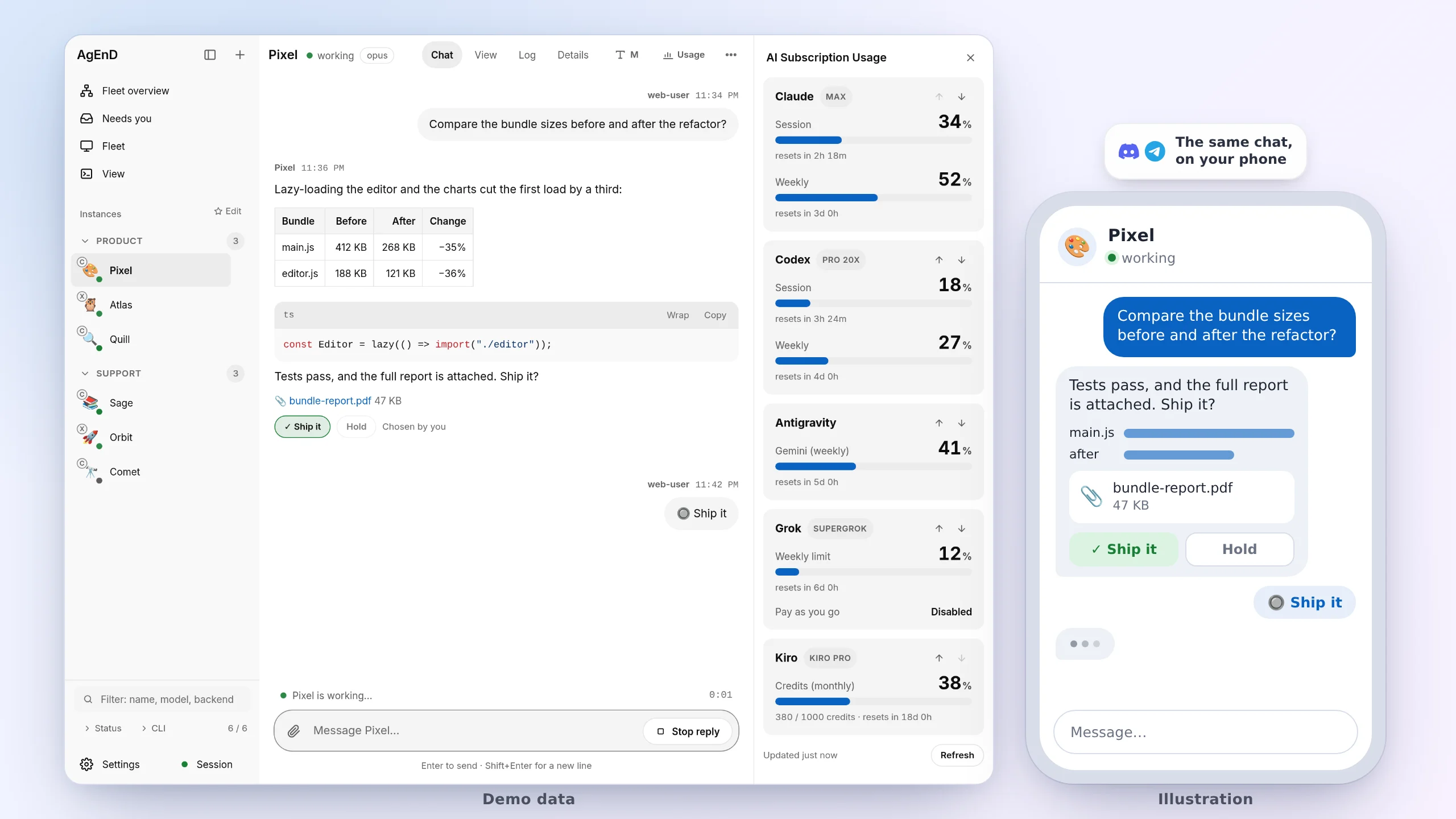
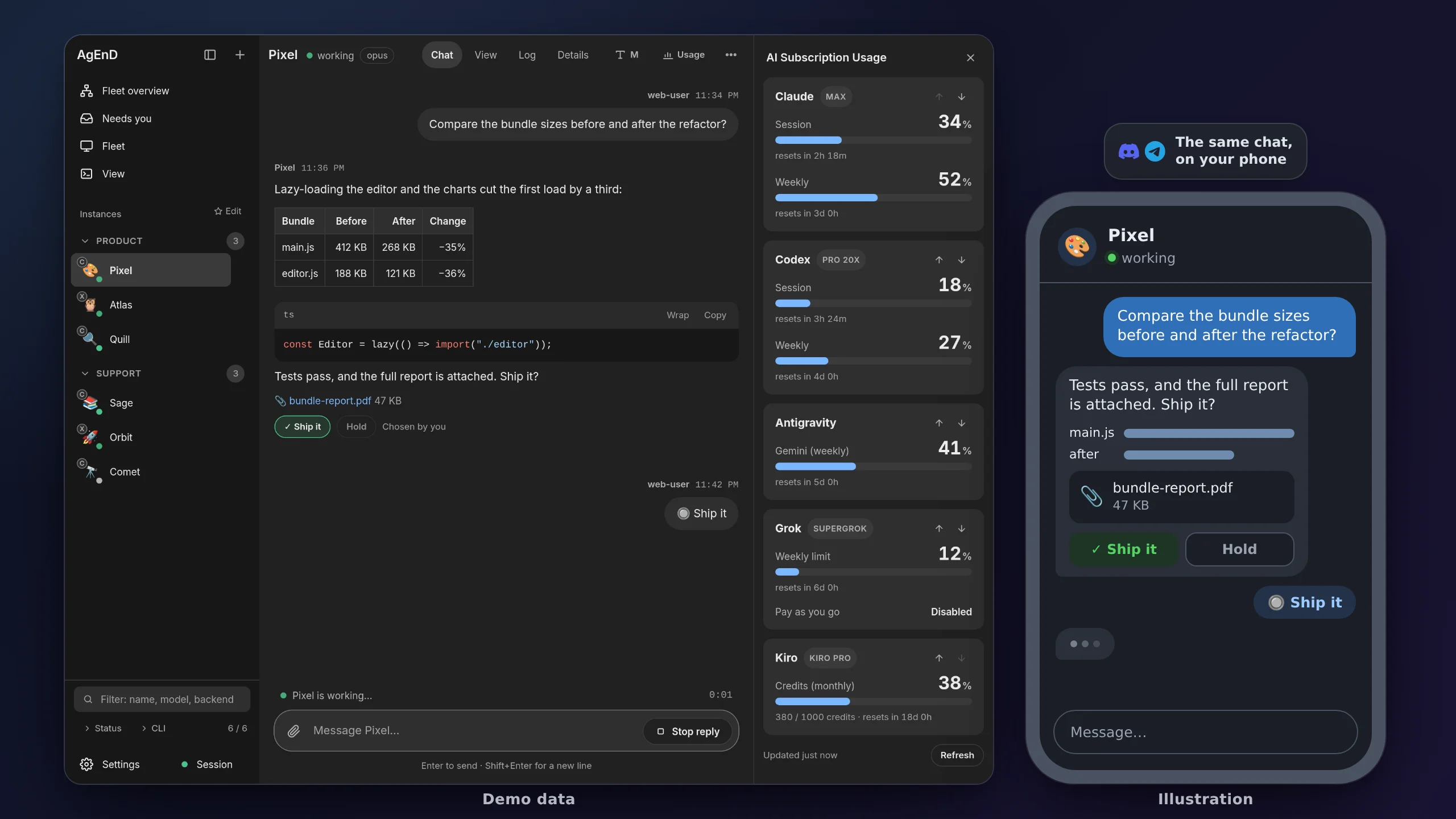
AgEnD 2.3 is the stable line, and 2.3.2 is its current release. This page is for people coming from 2.2.x (2.2.5 and 2.2.6 in particular). It starts with what to do when you upgrade, then lists the command changes, then the new features grouped by area. Already on 2.3.1 or a 2.3.2 beta? Start with New in 2.3.2. For what 2.2 added, see What’s new in 2.2.
New in 2.3.2
Section titled “New in 2.3.2”2.3.2 gathers everything from 2.3.2-beta.1 to beta.16. The full list is in the CHANGELOG.
Upgrading from 2.3.1:
- Send
/updatein General, or runagend updateon the host. - kiro on the classic engine: kiro-cli 3.0 drops it (
kiro_ui: legacy, the default for an instance that sets nokiro_ui). AgEnD now keeps kiro from updating itself and starts new kiro instances on the TUI. Move an existing one, with its conversation, withmigrate_kiro_instance, after a fleet admin confirms in General. A move is one-way. - Settings is redesigned: Fleet → Config is gone, and its old addresses lead to the new sections. An edit is unsaved until you press Save, and a change that needs a restart says so at the top of every page; AgEnD never restarts on its own.
- Agents in the Office are new:
office_viewandoffice_setstay off unless a person setsoffice_accessfor an agent. Rolling back to 2.3.1 keeps every office (without its Edit layout changes). - ClassicBot native replies trigger a bot only with
reply_triggerson (off by default); an @mention still does.
On a 2.3.2 beta: agend update stays on the beta channel and keeps getting betas. A DM notice setting saved by a beta is read as on, in the topic, and rewritten with a backup. A dashboard.office written by an earlier beta moves to office_access, with a backup.
What’s new:
- Settings: grouped by where you’d look (You, and Fleet: Agents, Agent defaults, Chat & connections, Web dashboard, Access & security, Advanced), one Save model, the value in effect on every field, search across every setting (
/or Ctrl K), and a phone layout. - Office: artists’ skin packs, the Cozy style, Edit layout, All offices, offices for picked people or for nobody, share links anyone can open, levels and profile cards.
- Guests: an admin grants each person the agents (or ClassicBot rooms) they may see and can send their sign-in code; every change is recorded.
- Usage report: every backend AgEnD runs, with a Reasoning column; Kiro’s numbers are estimated.
- kiro: the move to the TUI, V3 question cards answered from the chat, messages to a busy kiro within seconds, nothing typed into an editor or
!command that owns the pane, and restarts that follow a/compact. - Windows installer: browser sign-in for Kiro, Claude Code and Codex, Windows Terminal, a choice of WSL drive, network checks that say what failed, an install log, a stop before installing for the wrong account, and an opt-in check and repair of an existing install. See the Windows guide.
- Docker: a runbook an agent follows to set AgEnD up in a container and maintain it.
- Also: interrupted task work continues after a restart; you’re told when an agent starts over without its conversation; the setup page leaves the working directory optional and comes in 繁體中文; the first agent set up on a chat connection, with its working directory left empty, is the fleet’s General; Waiting for you lists only cards that wait on you.
Upgrade from 2.2.x
Section titled “Upgrade from 2.2.x”The steps, in order, are in the upgrade guide. In short:
-
How to update: send
/updatein General, or runagend updateon the host. The update installs 2.3, checks it, and restarts the fleet. The chat shows each step, and a failure says which step failed. -
Root or WSL-style hosts (#2369): if you run
agend updatefrom a shell with noXDG_RUNTIME_DIR(a plainwslshell,docker exec, cron, or root), 2.2.x cannot reach the systemd user service and rolls itself back to 2.2.x. Run this instead:Terminal window XDG_RUNTIME_DIR=/run/user/$(id -u) agend updateOr re-run the official install command. Once you are on 2.3 you no longer need this step.
-
Automatic rollback (#2420): if the new service does not start, the update tries to put the previous version back: its package, its service settings and, if it was running, its service. It does so only where it can prove what was there before; otherwise it keeps the recovery copies and tells you what to check. Its message says whether the previous version is running again and that the update did not succeed; if the recovery was incomplete, follow the steps it prints. From 2.3 on, an update on macOS (launchd) counts as successful only once the fleet is actually running. Upgrading a Mac from 2.2.x is the exception: 2.2.x’s own updater can report success without 2.3 running and does not roll back, so check that the fleet came up; if not,
npm i -g @songsid/agend@2.2.6thenagend restart(details, #2481). -
Disk space: keep about 235 MB free on top of what the install itself needs. The rollback keeps a copy of the version you are upgrading from while the new one installs, and a copy with its Node is about that size. If that copy cannot be made, the update stops before it changes anything (#2420); the install’s own space is not checked in advance.
-
Later updates use the new version’s own installer (#2264):
/updateandagend updaterun the target version’sagend-install --upgrade, so install, upgrade and repair take the same path. An interrupted install is repaired by running the install command again. If another install or update holds the install lock, the new one stops before changing anything and says why: let the other one finish, then run it again. -
Service settings are fixed on upgrade: on Linux, the unit gets
NotifyAccess=all(#2331), without which the fleet was restarted every 15 minutes.OOMPolicyis checked too (#2446). The update reports the values systemd actually loaded. -
Dashboard sign-in carries over (#2403): a browser signed in to the dashboard directly stays signed in. The exception: if another AgEnD on the same host replaced this browser’s sign-in cookie before you upgraded, sign in once more. A public-link sign-in does not carry over: it lasts only as long as that link, and a restart opens a new one.
-
Defaults that change after the upgrade:
- Task board in chat: cards that need you are not shown in General’s Needs you list until you set
needs_you.task_board: true(#2425). The daily summary is sent only when you setdefaults.task_board.summary_at. - New fleets: a new
fleet.yamlgetsdefaults.dashboard.task_board: false(#2391). Your existing file is not rewritten, and the task board works as before. - Canvas Worker effects were experimental and off (#2275), and have since been removed (#2793). The built-in ambient effects, such as falling petals and click stars, are not affected.
- CLI language follows
defaults.locale(#2404). If it is not set, a host at UTC+8 uses Chinese, and the machine-read lines stay in English. - Service hosts (#2356): on a host where the AgEnD service is installed,
agend fleet startandagend fleet stophand over toagend startandagend stop, so no second fleet runs beside the service.
- Task board in chat: cards that need you are not shown in General’s Needs you list until you set
-
Known issues:
- On WSL,
/loginoccasionally leaves the main process stuck until the watchdog restarts it (#1880). The cause is still under investigation. - On Codex, a silent schedule sometimes shows “could not confirm delivery” even though it was delivered. It is not sent again (#2301).
- On WSL,
Command changes
Section titled “Command changes”| In 2.2 | In 2.3 |
|---|---|
agend fleet start (whole fleet) |
agend start. agend fleet start <name> still starts one instance |
agend fleet stop (whole fleet) |
agend stop. agend fleet stop <name> still stops one instance |
agend fleet restart |
agend restart. The old form still runs it, is deprecated, and goes away in 2.4 |
agend fleet status |
agend ls --resources. agend ls (also agend status) shows the instances |
agend fleet logs |
agend logs. The old form is removed |
agend schedule trigger |
Removed. Use agend schedule enable or the Task Board |
/install-cli in chat |
Removed. Use /login |
agend install --activate |
Removed. Activation is the default. Use --no-activate to only write the service file |
/dashboard in chat |
Still works, deprecated. Use /web |
| Windows desktop shortcuts | agend shortcuts (inside WSL) makes or updates them |
Typing a removed command prints the new one.
New features
Section titled “New features”Fleet and tasks
Section titled “Fleet and tasks”
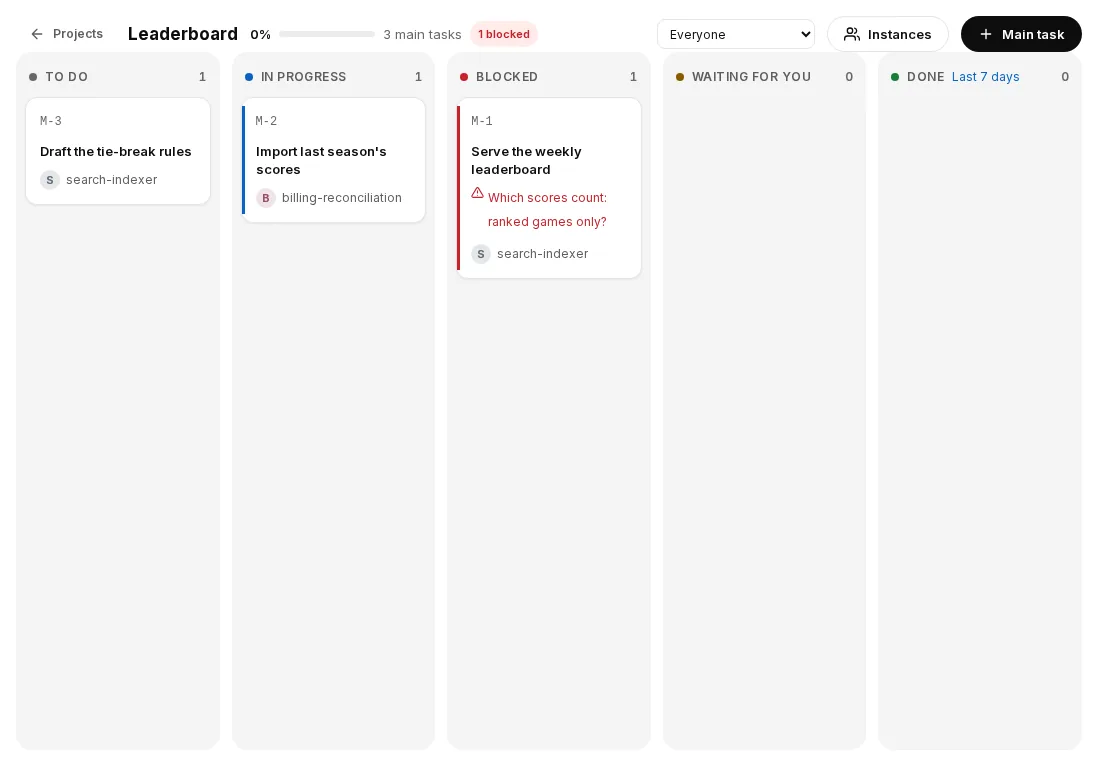
- Task board (
Fleet → Tasks): a board of projects, main tasks (M-n) and subtasks (S-n). A main task follows its subtasks’ progress. Cards support dependencies, comments and history, and you can drag and filter them. The public link shows the board read-only.- Agents work from it: an agent is notified when a card is assigned to it, sent back, answered, commented on, confirmed or cancelled. Changes within 10 seconds are grouped into one message. Each agent works on one card at a time.
- Who confirms: only cards you handed out wait for your confirmation (#2434). A card an agent handed out is confirmed by that agent. If that agent is deleted, its cards go back to you (#2451).
- In chat: set
needs_you.task_board: trueand the cards waiting on you (to confirm, or stuck) appear in General’s Needs you list, where you can confirm, send back or reply. - Daily summary: set
defaults.task_board.summary_at(for example"09:00", in the fleet’s timezone) to get it. It is off until you set it.
- Office view (
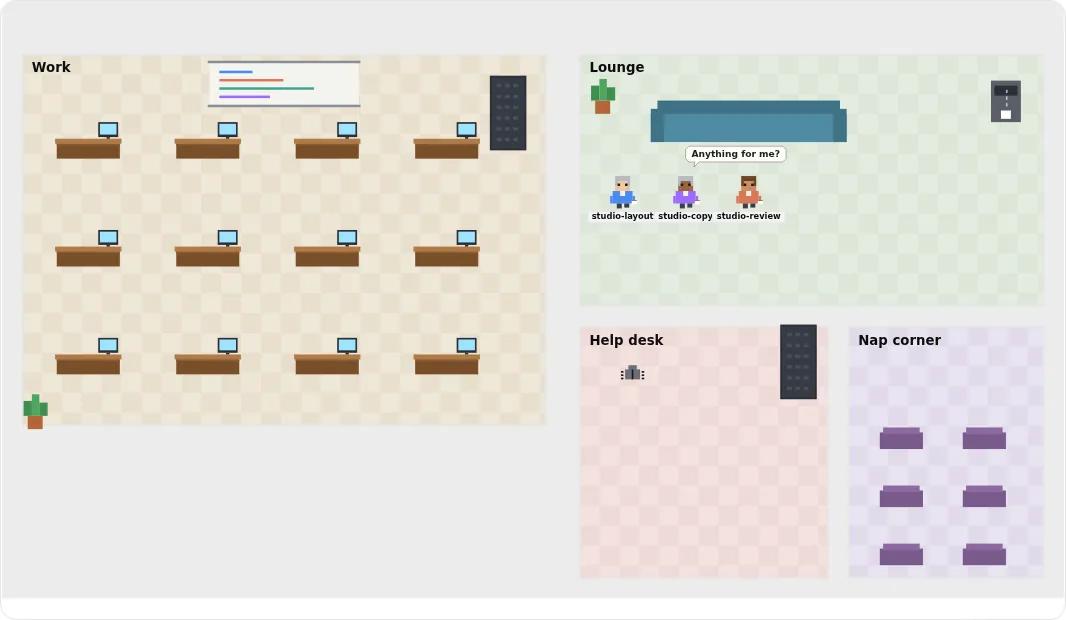
Fleet → Org chart → Office, #2399): the fleet drawn as a pixel-art office. Each team is a room and each agent has a desk. Working agents type, idle ones drink tea, paused ones sleep, and an agent waiting on you raises a hand. Messages between agents fly down the corridor. Two styles, Desks and Studio. Admins can add, rename, delete and furnish offices. Read-only sessions and the public link can only look; guests do not see the org chart or the Office view. - Restart and startup:
agend restartis the one full restart. It goes through systemd, launchd or the detached fleet, whichever runs AgEnD.agend restart <name>restarts one instance now (#2356).- The dashboard opens while agents are still starting, and shows each agent’s progress (#2398).
startup.concurrencyreally starts that many instances at once. Under memory pressure they still start one at a time (#2288).- Under memory pressure, deferred start-up no longer causes a restart loop (#2461).
- When an agent’s Claude Code session dies of out-of-memory twice in a row, it stops as crashed and tells you, instead of restarting over and over (#2015, #2035).
- Creating an agent, or changing a fleet-wide setting, no longer restarts every agent (#2317).
- Faster dashboard: state updates are about 4 times faster, and about 7 times faster with several tabs open (#1956).
Web dashboard
Section titled “Web dashboard”
- Global search (Ctrl+K, or ⌘K): finds chat messages, messages between agents and tasks, grouped by agent. Click a result to jump to the message. In a chat, Ctrl+F searches only that agent. You can filter by agent or team, time and source, or show only what you said. Fleet admins can search, on this machine or over the public link (
web.search.public_link: falsekeeps it off the link); guests cannot (#2486). From 2.3.1 the index has no age limit by default (web.search.retention_daysunset or 0; 300,000-row cap); 2.3.0 keeps 90 days. - Chat:
- Reply to a message: hover and press ↩, right-click, swipe left on a phone, long-press, or press R. A reply sent from the web is a native reply on Discord and Telegram too (#2281).
- Reactions: an agent can react to a web message with an emoji, for example when a message needs only an acknowledgement (#2305).
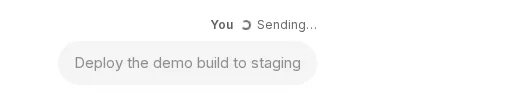
- Send states: a message appears grey as soon as you send it, and turns normal when the agent receives it. If sending fails, you can retry, put the text back in the box, or delete it. Images and files show their own upload progress. A retry within 10 minutes is recognised and not delivered twice; AgEnD keeps that record in memory only, so after a restart a retry may arrive again.
- Images can be zoomed and dragged (#2333). Undo and redo work in every text field (Ctrl/⌘+Z, Ctrl+Shift+Z) (#2342). On a desktop, the input box is one line shorter (#2215).
- Appearance:
- An agent’s theme can colour the whole page, its sidebar, title bar and right column. Override it in ⋯ → page colours (#2196).
- The identity card is one button in the chat header (#2217).
- Custom app icon: Settings → Web dashboard → App icon (#2308). Your picture is the one that Add to Home Screen shows.
- Usage panel:
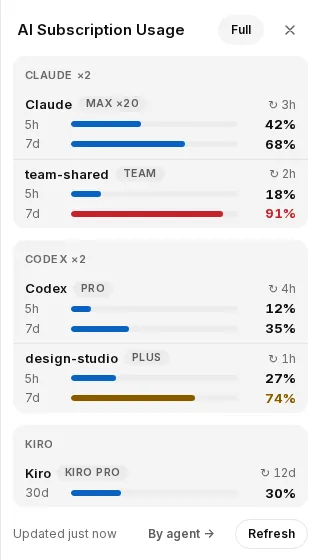
- A Compact / Full switch next to the title. Compact groups accounts by provider, a few lines per account: name, plan and reset time, then a bar and a percentage for its shorter and longer window where it has them (under two days, such as 5 hours, and two days or more, such as a week or a month). Antigravity gets a line per quota pool. Your choice follows you to each device.
- Each Claude login has its own row, including the default account and every profile (#2236). An account that is used up shows 100% and its reset time. A rate-limited account shows “Rate limited”.
- If numbers cannot be read, the panel keeps the last ones and marks them “stale · cached at HH:MM”, instead of flashing “could not load” (#2236, #2385).
- Antigravity shows its plan name, and the right Gemini quota for paid plans. Gemini 4 Argon has its own line (#2240).
- Canvas Worker effects (experimental, off by default; removed since, #2793): with
web.experimental.canvas_workeron, you could upload effects, place them in chat or on your own page, and let an agent place its own through a tool. They ran in an isolated worker that could not reach the page’s content or the input boxes (#1629).
Remote access and security
Section titled “Remote access and security”- Public link on your own domain (named tunnel, #2307): set
web.public_link.hostnameand a Cloudflare tunnel token in Settings, and the public link keeps the same address every time, so a home-screen shortcut on your phone keeps working. The token is only set or cleared, never shown back, and never written to the log. A wrong format is reported at once (#2344).- Lifetime: with your own domain,
ttl_minutescan be 1 to 10080 (7 days), or0for no expiry (#2448). A quick tunnel is capped at 480 minutes. - Reopen after a restart:
web.public_link.auto_open(off by default) reopens the link after a fleet restart, for the admin who opened it last. It works only with your own domain.
- Lifetime: with your own domain,
- Verified browser authority on your own domain (#2453):
web.verified_authority.named_link(off by default) lets a browser that you confirm act with your account, through your own domain only. A quick tunnel can never qualify. - Settings changes from a verified page (#2170): if your account is an admin of the connection a change affects, the change that was held back applies directly.
- Two AgEnD dashboards in one browser no longer sign each other out (#2396).
- Dependencies: the bundled Node is 22.23.4 (#2405).
npm auditreports no vulnerabilities for production or development packages (#2408). Two ReDoS patterns are fixed (#2416).~/.agendis always created with mode 0700, and an older, group-writable one is tightened on the next start (#2435).
Settings and per-agent limits
Section titled “Settings and per-agent limits”- Per-agent dashboard switches (#2391):
dashboard: { appearance, task_board, web_settings }, set on one agent or indefaults. An agent whose switch is off cannot use the tools for that part of the dashboard. Set on an agent, it overrides the default for that agent only. - Sign in to a backend from the dashboard (#2233): from Settings’ sign-in controls, the
/backendmenu, Needs you, and the banner on each page. - Dashboard-only fleets: the Settings page can create the first agent without a chat bot.
Backends
Section titled “Backends”- Codex:
- When Codex gives up after its 429 retries, AgEnD asks it to carry on after 30, 60 and 120 seconds, up to three times (#2282). “Quota exceeded” is treated as a used-up quota, and the agent pauses.
agend doctorhas a “Codex package” row that warns when the installation is incomplete (#2357).
- Claude Code: the idle cold-start prompt is answered automatically, so the agent no longer waits on it (#2268).
- kiro-cli 2.33: with
--trust-all-tools, the “Trust this workspace?” prompt is answered automatically. - Grok: a quota or rate-limit word in code or chat no longer counts as a used-up quota (#2324). An open background watcher no longer queues messages (#2334).
Language
Section titled “Language”- Dashboard and bot messages: the confirmation cards, buttons, server messages on the web and the
/loginterminal page are in Chinese when the language iszh-TW(#2390). - CLI:
agendmessages followdefaults.locale(see the upgrade notes above).
Other fixes
Section titled “Other fixes”- Problem reports: a report file with secrets removed, plus a prefilled GitHub link (#2258).
- Settings with YAML anchors: when connections share settings through anchors and aliases, editing one in Settings changes only that connection (#2208). A connection without
modeno longer widens confirmation to every connection (#2211). - Offline restart: if the network is down when you restart or update, “Fleet ready” is sent once the connection is back (#2213).
agend lsand attach menus align Chinese labels correctly.
Still true from 2.2
Section titled “Still true from 2.2”- The
gemini-clibackend is gone (since 2.1.12). Usebackend: antigravity. - musl Linux such as Alpine, Linux without systemd, and native Windows are not supported. On Windows, run AgEnD in WSL with systemd. See Getting Started.
For every change, see the changelog.